Why Most SEO Blogs Get Traffic But Generate Zero Revenue
You've published 15 blog posts. Google Analytics shows 2,000 monthly visitors. You're ranking page 1 for 8 keywords. And yet: zero inbound calls from blog traffic.
What's happening? You're targeting the wrong keywords.
Most businesses make this mistake. They use keyword research tools (Ahrefs, SEMrush, Ubersuggest), sort by search volume, and write content for the highest-traffic terms. The result? Blog posts like:
"What is HVAC and how does it work?" (5,400 searches/month)
"DIY water damage cleanup tips" (2,900 searches/month)
"Types of commercial roofing materials" (1,800 searches/month)
These keywords get clicks. They don't get customers.
Someone searching "what is HVAC" is a homeowner doing research, not a buyer ready to hire a contractor. Someone searching "DIY water damage cleanup" is explicitly trying to avoid calling you. And someone searching "types of commercial roofing materials" is an architect doing research — not a property owner with a leaking roof.
You're attracting the wrong audience because you're targeting awareness-stage keywords when you need buyer-intent keywords.
HVAC contractor published 12 blog posts targeting high-volume informational keywords. 3,500 monthly blog visitors. Zero calls. We rebuilt their content strategy using the 3-Bucket Framework — targeting buyer-intent keywords like "emergency AC repair Phoenix" and "24-hour HVAC service near me." Traffic dropped to 1,200 visitors/month. Inbound calls jumped from 0 to 15/month. Lower traffic, higher revenue.
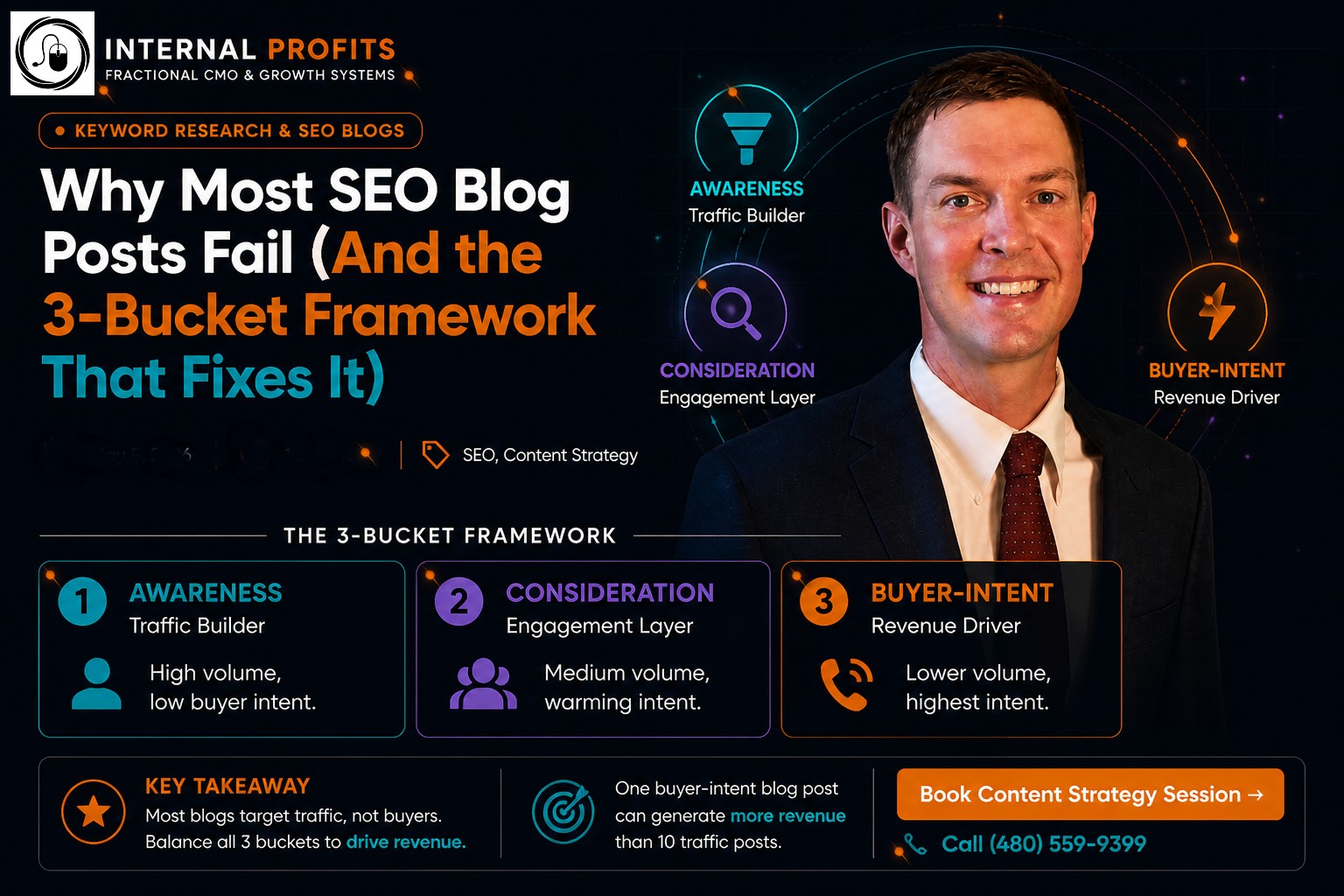
The 3-Bucket Keyword Research Framework
Here's how we categorize keywords across the buyer journey — and why you need content in all three buckets:
The mistake most businesses make: Publishing 80% Bucket 1 content, 15% Bucket 2 content, and 5% Bucket 3 content. Then wondering why blog traffic doesn't generate revenue.
The smart distribution: 30% Bucket 1, 30% Bucket 2, 40% Bucket 3. You still build authority with awareness content, but you prioritize buyer-intent keywords that actually convert.
Bucket 1: Awareness Keywords (Traffic Builder)
These are your "how to" and "what is" keywords. High search volume, low commercial intent. Use these strategically — not as your primary content strategy.
When to Write Bucket 1 Content:
You're a new website with low domain authority (awareness content helps you rank for SOMETHING). Moreover, you're targeting a specific pain point that leads to your service. For instance, "signs of water damage" leads naturally to emergency water extraction.
Additionally, you're capturing long-tail variations that Google associates with your service. "How HVAC systems work" builds relevance for "HVAC repair" in Google's understanding of your site.
When NOT to Write Bucket 1 Content:
You already have 10+ blog posts and zero leads (you don't need more traffic, you need better keywords). Furthermore, the keyword has zero connection to your service. For example, "DIY HVAC installation" for a contractor who doesn't want DIY customers.
The search intent is purely educational with no buying signal.
A restoration company publishes "10 Signs of Hidden Water Damage in Your Home" (Bucket 1). The blog ranks page 1, drives 800 monthly visitors. At the end, a CTA offers a free water damage inspection. 3-5% of readers book the inspection. The blog doesn't generate immediate revenue, but it feeds qualified leads into the funnel.
Bucket 2: Consideration Keywords (Engagement Layer)
These keywords target people actively researching solutions. They're past the "what is this?" phase and into the "which option is best?" phase.
Bucket 2 Keywords Include:
"Best [service] in [city]" (e.g., "best HVAC companies Phoenix")
"How much does [service] cost" (e.g., "commercial roofing cost per square foot")
"[Service] vs [alternative]" (e.g., "HVAC repair vs replacement")
"How to choose a [service provider]" (e.g., "how to choose a water damage restoration company")
Why these convert better: The reader is actively comparing options. They're closer to a buying decision. Consequently, a well-written Bucket 2 blog post that positions your business as the obvious choice can convert 10-15% of visitors within 2-4 weeks.
What to Include in Bucket 2 Content:
Clear criteria for evaluating service providers (with your company checking all the boxes). Pricing transparency (even if it's "typical range: $X-$Y depending on project scope"). Additionally, include comparison charts or decision frameworks.
Social proof matters here. Case studies, testimonials, and client results build trust. Therefore, strong CTAs like "Schedule a free estimate" or "Call for pricing" should be prominent.
Bucket 3: Buyer-Intent Keywords (Revenue Driver)
These are your money keywords. Lower search volume, but every visitor is a qualified lead.
Bucket 3 Keywords Include:
Emergency services: "emergency [service] near me", "24-hour [service] [city]"
Location + service: "[service] [city]", "[service] contractor near me"
Specific solutions: "water damage restoration Phoenix", "commercial HVAC repair Scottsdale"
Urgent intent: "same day [service]", "immediate [service]"
Why these generate revenue: Someone searching "emergency HVAC repair Phoenix" at 2am isn't doing research. They need help NOW. First result gets the call.
What to Include in Bucket 3 Content:
Phone number in the first 100 words (and in a sticky header that follows scroll). Service area clearly stated (city, neighborhoods, zip codes). Response time ("Onsite in 60 minutes", "Same-day service available").
Trust signals matter intensely here: licensed, insured, 10+ years experience, 500+ 5-star reviews. Multiple CTAs (call button, form, chat widget) throughout the page.
Commercial roofing contractor published "Emergency Roof Repair Phoenix" (Bucket 3 keyword, 90 monthly searches). Blog ranks #2 on Google. Generates 40 monthly visitors. Converts 8-12 visitors/month into phone calls at $220 cost-per-lead. One blog post. $2,640-$3,960 in monthly inbound lead value. That's the power of Bucket 3.
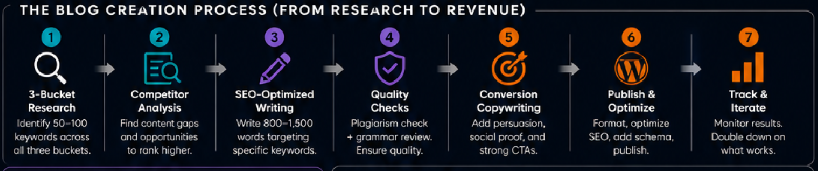
The Blog Creation Process (From Research to Revenue)
Here's how we build SEO blogs that actually generate revenue:
Timeline: 2-4 weeks per blog post from keyword research to published content optimized for rankings and conversions.